> ## Documentation Index
> Fetch the complete documentation index at: https://docs.desivocal.com/llms.txt
> Use this file to discover all available pages before exploring further.
# Getting Started
> Explore our API Reference to get the most out of DesiVocal.
Learn how to get your API key.
Learn the details of using the API.
## [Authentication](https://www.desivocal.com/dashboard)
In order to use our API you need to get your `X_API_KEY` first.
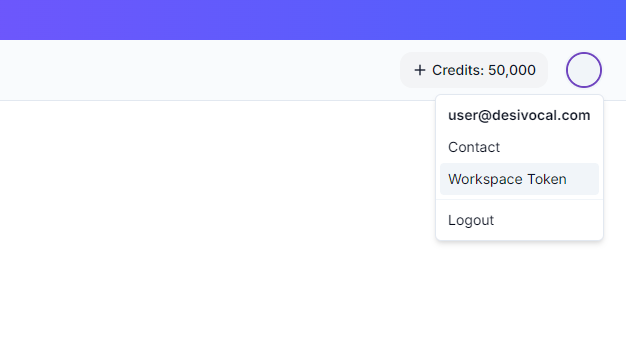
Go to your [dashboard](https://www.desivocal.com/dashboard), select workspace and in the upper right corner click on your profile picture -> "Workspace Token". You can generate a new `X_API_KEY` by clicking on the spinning arrows. This will invalidate your old `X_API_KEY`. Keep your `X_API_KEY` key secret!
 ## [API Reference](/api-reference)
> ### Notes
>
> * All API requests require an `X_API_KEY` header for authentication.
> * The `voice_id` in the TTS generation requests may vary. Use the appropriate `voice_id` for the desired voice.
> * Ensure proper encoding when sending non-English text in the request body.
## [API Reference](/api-reference)
> ### Notes
>
> * All API requests require an `X_API_KEY` header for authentication.
> * The `voice_id` in the TTS generation requests may vary. Use the appropriate `voice_id` for the desired voice.
> * Ensure proper encoding when sending non-English text in the request body.